





Non è possibile disinstallare CyberLink True Theater Enhancer da Installazione applicazioni di Windows. Come è possibile procedere?
Problema:
L’utente non è in grado di disinstallare CyberLink TrueTheater Enhancer utilizzando Installazione applicazioni di Windows.
Causa:
Il programma CyberLink TrueTheater Enhancer è danneggiato o non installato correttamente.
Soluzione:
- Riavviare il computer.
- Fare clic qui per scaricare l’applicazione Microsoft per eseguire il cleanup.
- Per eseguire l’applicazione Microsoft per il cleanup, seguire la procedura di seguito:
(1) Fare clic su Start, fare clic su Tutti i programmi, quindi fare clic su Windows Installer Clean Up.
(2) Nella finestra Windows Installer Clean Up, selezionare TrueTheater Pack.
(3) Fare clic su Rimuovi.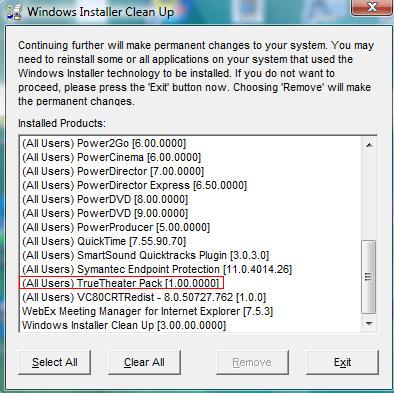
- Rimuovere la cartella di installazione " TrueTheater Enhancer "
Per Windows XP e Windows Vista 32 bit:
Il percorso originale della cartella TrueTheater Enhancer è: C:\Programmi\CyberLink\TrueTheater Pack
Per Windows Vista 64 bit:
Il percorso originale della cartella TrueTheater Enhancer è: C:\Programmi(x86)\CyberLink\ TrueTheater Pack - Rimuovere la cartella C:\Programmi\InstallShield Installation Information{ 2C9617C7-6A62-4513-B96D-7C06B5C6C1F5}
(È una cartella nascosta. Attivare l’opzione mostra file e cartelle nascosti in Esplora risorse->organizza->Opzioni cartella e ricerca->visualizza->Cartelle e file nascosti) - Per eseguire Editor del Registro di sistema, seguire la procedura di seguito:
Per Windows Vista 32/64 bit:
(1) Fare clic su Start, fare clic su Tutti i programmi, fare clic su Accessori, fare clic su Esegui quindi digitare Regedit.
Per Windows XP:
(1) Fare clic su Start, fare clic su Esegui quindi digitare Regedit
Per Windows Vista 32 bit e Windows XP:
(2) Rimuovere HKEY_LOCAL_MACHINE\SOFTWARE\CyberLink\TT Pack
(3) Rimuovere HKEY_LOCAL_MACHINE\SOFTWARE\Microsoft\Windows\CurrentVersion\Uninstall\ { 2C9617C7-6A62-4513-B96D-7C06B5C6C1F5}
(4) Rimuovere HKEY_LOCAL_MACHINE\SOFTWARE\Microsoft\Windows\CurrentVersion\Uninstall\InstallShield Uninstall Information\ { 2C9617C7-6A62-4513-B96D-7C06B5C6C1F5}
(5) Rimuovere HKEY_LOCAL_MACHINE\SOFTWARE\Microsoft\Windows\CurrentVersion\Uninstall\InstallShield_ { 2C9617C7-6A62-4513-B96D-7C06B5C6C1F5}
Per Windows Vista 64 bit:
(2) Rimuovere HKEY_LOCAL_MACHINE\SOFTWARE\WOW6432Node\CyberLink\TT Pack
(3) Rimuovere HKEY_LOCAL_MACHINE\SOFTWARE\Wow6432Node\Microsoft\Windows\CurrentVersion\Uninstall\{ 2C9617C7-6A62-4513-B96D-7C06B5C6C1F5}
(4) Rimuovere HKEY_LOCAL_MACHINE\SOFTWARE\Wow6432Node\Microsoft\Windows\CurrentVersion\Uninstall\InstallShield Uninstall Information\ { 2C9617C7-6A62-4513-B96D-7C06B5C6C1F5}
(5) Rimuovere HKEY_LOCAL_MACHINE\SOFTWARE\Wow6432Node\Microsoft\Windows\CurrentVersion\Uninstall\InstallShield_ { 2C9617C7-6A62-4513-B96D-7C06B5C6C1F5}
Riavviare il computer. Terminate le procedure, TrueTheater Enhancer sarà completamente rimosso.


