





I cannot install YouCam and get the error message "YouCam requires a component of Microsoft Windows Media Player to function properly." What should I do?
Reason:
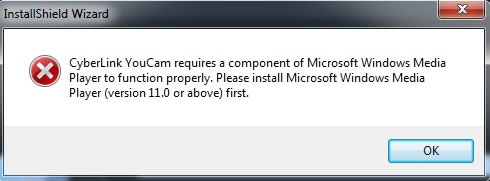
The message "YouCam requires a component of Microsoft Windows Media Player to function properly. Please install Microsoft Windows Media Player (version 11.0 or above) first." pops up when:
- Windows Media Player (version 11.0 or above) is not installed.
- Windows Media Player is disabled on your computer.
Solution:
- Please ensure you installed Windows Media Player (version 11.0 or above).
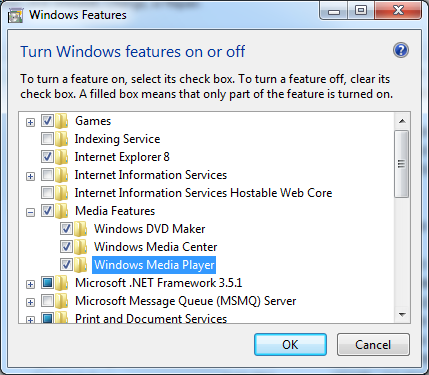
- Go to Control Panel > Programs > Programs and Features > Turn Windows features on or off. In the "Windows Features" window, find Media Features and then ensure that Windows Media Player is selected.
- Click OK to save your changes.
Note: If you still can’t resolve the problem, you can contact CyberLink Technical Support. Before contacting Technical Support, please prepare and include the information listed here. The more info you provide, the more we can understand your issue and better service will be provided.


