What can I do if the video preview is not smooth in CyberLink ColorDirector?
Please ensure your platform meets the minimum system requirements.
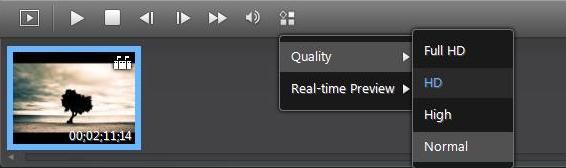
If video preview is lagging or unsmooth on your platform, selecting a lower preview quality during playback may help to reduce the lag. Follow the below steps to do that:
1. Select  Configure playback options above the Storyboard.
2. Select Quality > Select High or Normal quality.