





How do I turn the TrueTheater feature on/off in CyberLink PowerDVD 15?
To enable TrueTheater in PowerDVD 15, do this:
- During video or disc playback, click on the
 button on the playback controls to open the TrueTheater window.
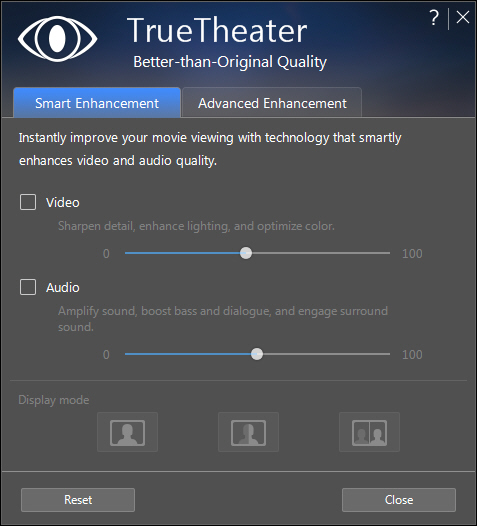
- On the Smart Enhancement tab, just select the "Video" option to enable TrueTheater video enhancements. Select the "Audio" option to enable TrueTheater audio.
Note: TrueTheater audio is only available during video playback.
To fine tune the TrueTheater enhancements during video/audio playback, do this:
- Click on the Advanced Enhancement tab.
- Customize the enhancements by selecting or deselecting the enhancements applied. You can also use the available sliders to set the amount of each enhancement used on the video.
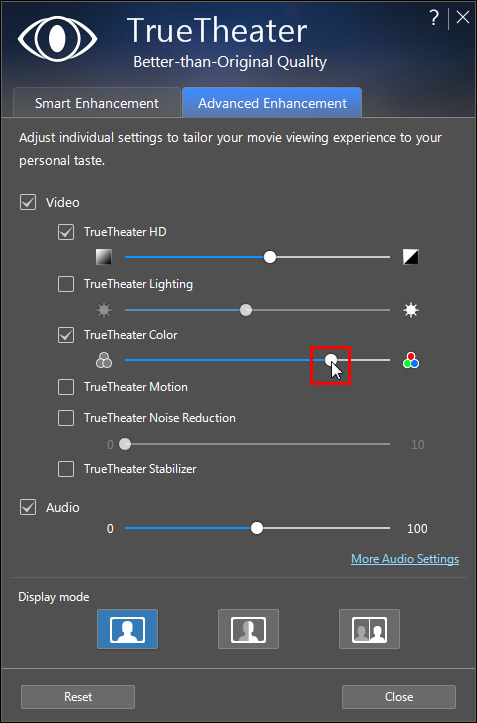
To learn more about TrueTheater, please refer to: https://www.cyberlink.com/stat/technology/enu/true-theater-solution.jsp
Note: TrueTheater and hardware acceleration cannot both be applied during video playback at the same time. TrueTheater video enhancements are not available when the video resolution exceeds 1080p.
Related Articles:


