





What is the Spatial Audio Panner feature in CyberLink AudioDirector 9?
CyberLink AudioDirector 9 now supports the Spatial Audio Panner feature, which mainly helps you create and edit the spatial audio* for 360° video files.
Spatial Audio is known as ambisonic sound. It emulates the audio as amplified from different sources that are located at different positions in a virtual 360° stereoscopic space.
For example, when you are watching a music concert's 360° video that was recorded with spatial audio, you can identify that the sound from the keyboard, is on your right hand side, the sound from the drums, is on your left hand side, and the sound from the singer, is at the center of the stage with spatial awareness.
To use the feature, do this:
- Click the Mix button
- Add a 360° video file to a mix track.
- Click
 to set the mixing profile setting.
 - Select the output channel as Spatial Audio, and then click OK to save the settings.
- Click Spatial Audio Panner to configure each audio track's audio source position in a 360° virtual space by adjusting the Azimuth (The direction of the audio source position), and the Elevation (The height of the audio source position).
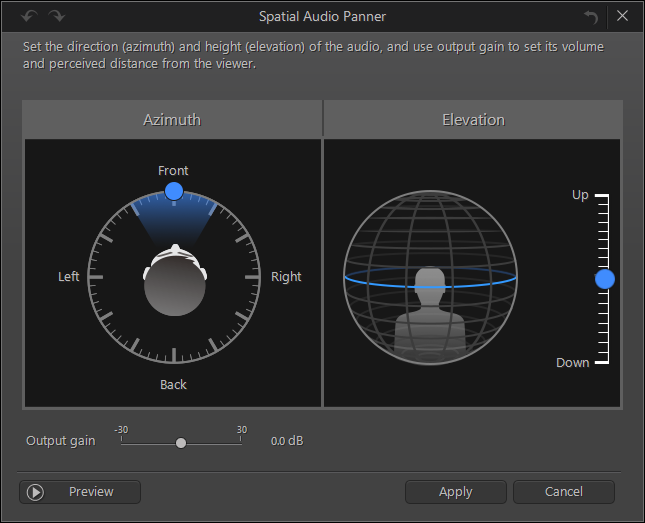
To learn more about the Spatial Audio Panner feature, please view the video tutorial at DirectorZone.
Note:
* AudioDirector 9 supports editing and producing the spatial audio in 4 channels for 360° video files. The feature is not supported for video files that are encoded with 5.1 or above channels audio.


