





What is Nested Project Editing in CyberLink PowerDirector 365?
The Nested Project Editing enables you to insert your previously saved projects into a new project on the timeline. To insert a nested project, drag a project in the Media Library > My Projects page to the timeline. Or open the file menu, and then click on the Insert Project option.
On the timeline, when nested projects are inserted, the timeline will divide into tabs. One tab is for the master project, and the others are for each nested project. In the master project tab, the nested projects are labelled with the "pds" text on the clip.
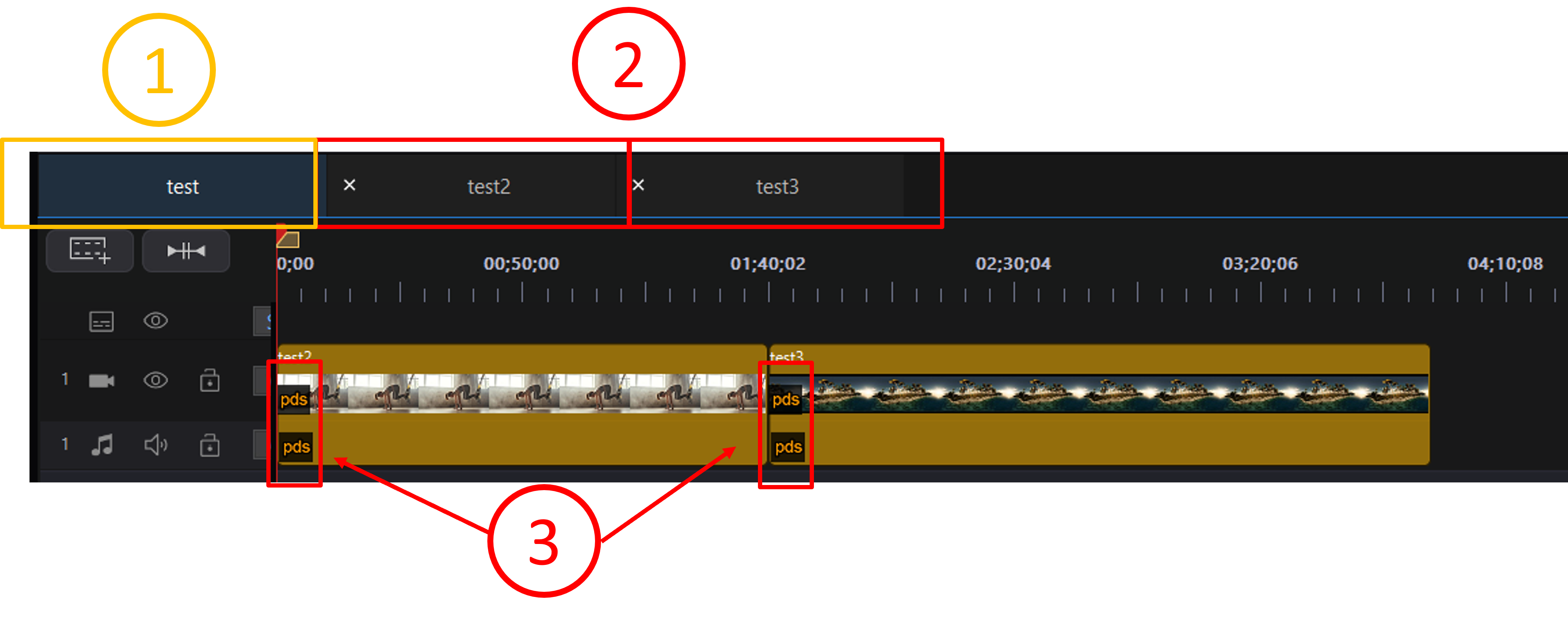
1. The Master Project tab
2. The Nested Project tab. You can click on the tab to edit the respective nested project
3. The nested projects are labelled with the "pds" text on the clip
You can further edit a nested project in its tab. The modification on the nested project will be automatically updated on the current master project, but will not affect the original source file of the nested project.
For more Nested Project Editing related information, please visit the tutorial on PowerDirector online help portal.


