





How do I use the AI Speech to Text feature in CyberLink PowerDirector 365?
CyberLink PowerDirector 365 now supports using AI technology to detect the speech in your clips to generate subtitles. The feature will generate text in the Subtitles Room automatically for your project.
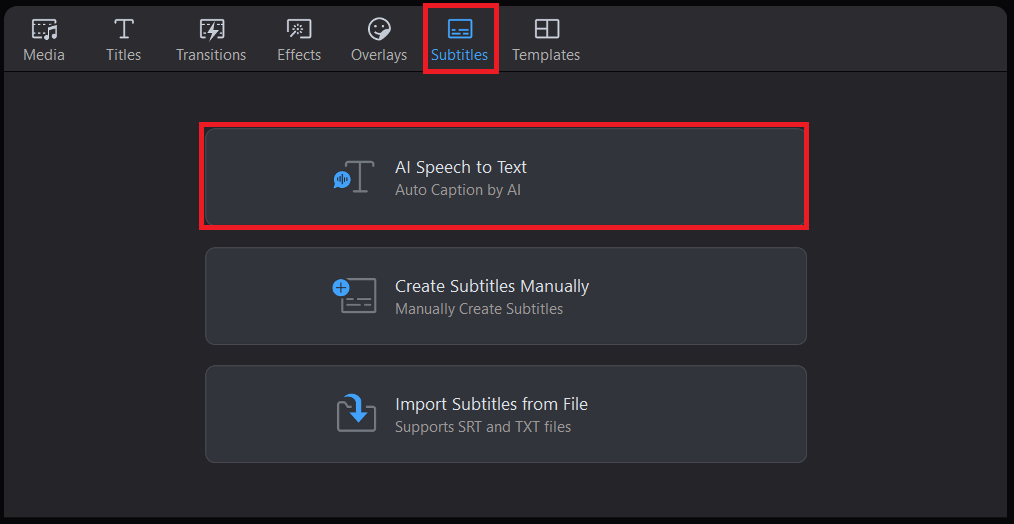
To use the AI Speech to Text feature*, simply go to the "Subtitles Room" and then click "AI Speech to Text".
The AI Speech to Text feature allows you to select a specific range or clip on the timeline, right click on the selected clip/range and then select "AI Speech to Text", or refer to the following steps:
- Select a clip or range on the timeline.
- Enter the Subtitles Room.
- Select "AI Speech to Text"
- Enable the option "Transcribe selected range only"
- Click "Create" to apply the feature to the selected range/clip.
Supported languages:
PowerDirector 2027*** /365 Windows version: English, Traditional Chinese, Japanese, Spanish, German, French, Italian, Korean, Portuguese
PowerDirector 2026/2025/2024 Windows version: English, Traditional Chinese, Japanese
Mac version: English, Traditional Chinese, Japanese, Spanish, German, French, Italian, Korean, Portuguese
Note:
*Starting from Aug. 2024, AI Speech to Text (PowerDirector 365 Windows version) supports more languages with the new AI engine. Therefore, AI Speech to Text (PowerDirector 365 Windows version) became a credit-based feature. It consumes credits for text generation. If your current credits are insufficient, you can click the Get Credits button in the feature window to purchase additional credits.
**Starting from Jul. 2025, AI Speech to Text (PowerDirector 365 Mac version) applies the new AI engine to enhance transcription accuracy. Therefore, AI Speech to Text (PowerDirector 365 Mac version) became a credit-based feature. It consumes credits for text generation. If your current credits are insufficient, you can click the Get Credits button in the feature window to purchase additional credits.
***Starting from Sep. 2026, AI Speech to Text (PowerDirector 2027 Ultimate/Ultra edition or above) applies the new AI engine to enhance transcription accuracy. Therefore, AI Speech to Text (PowerDirector 2027 Ultimate/Ultra edition) became a credit-based feature. It consumes credits for text generation. If your current credits are insufficient, you can click the Get Credits button in the feature window to purchase additional credits.


