





What can I do if my CyberLink mobile app displays the message “Your current Google Play Store account has no purchases” when I try to restore my purchase or subscription?
Google allows users to sign in to multiple Google accounts on a single mobile device. When the primary Google account on the device is not the one used to buy the full version or subscription of PowerDirector Mobile/PhotoDirector Mobile/ActionDirector Mobile/Promeo, this message displays when trying to restore the purchase.
To resolve the issue, it’s suggested that you follow these steps to set the Google account you used to make the purchase as the primary account on the mobile device.
- Make sure to log in to the device and Google Play with the Google account that had purchased the Cyberlink mobile app.
2. Pull down the notification tray and tap the gear icon to enter the Android settings page.
3. Find "Application Manager", "App info" or “Apps & Notifications” on your device. Find "Google Play Services" and "Google Play Store", and then tap "MANAGE SPACE" (Android 8.1 and before) or "STORAGE & CACHE"(Android 9.0 and after).
※ Please be advised that "Google Play Services" is not an app, but a background program, so it can only be seen in "App Info / Apps & Notifications".
※ To prevent the loss of files, it’s advised that you back up your projects and files to Google Cloud before clearing the cache.
4. Enter the “Storage” page and then tap the trash can icon with the “Clear cache” title.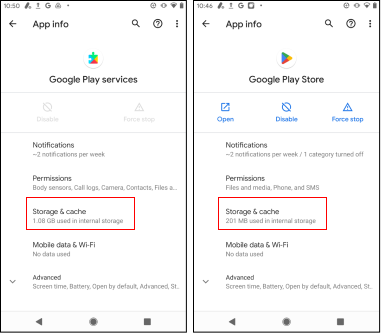
5. Reboot the device and then launch the PowerDirector Mobile/PhotoDirector Mobile/ActionDirector Mobile/Ad Director app again and use "Restore Purchase" to restore the full version or subscription.
Note:
If this issue persists, please contact CyberLink Support through “Send feedback” in the app settings menu.
(#activation, #restore, #restore purchase, #restore subscription, #register, #registration, #watermark, #shows watermark)


