





How do I enable the Mixer Panel in CyberLink AudioDirector 5?
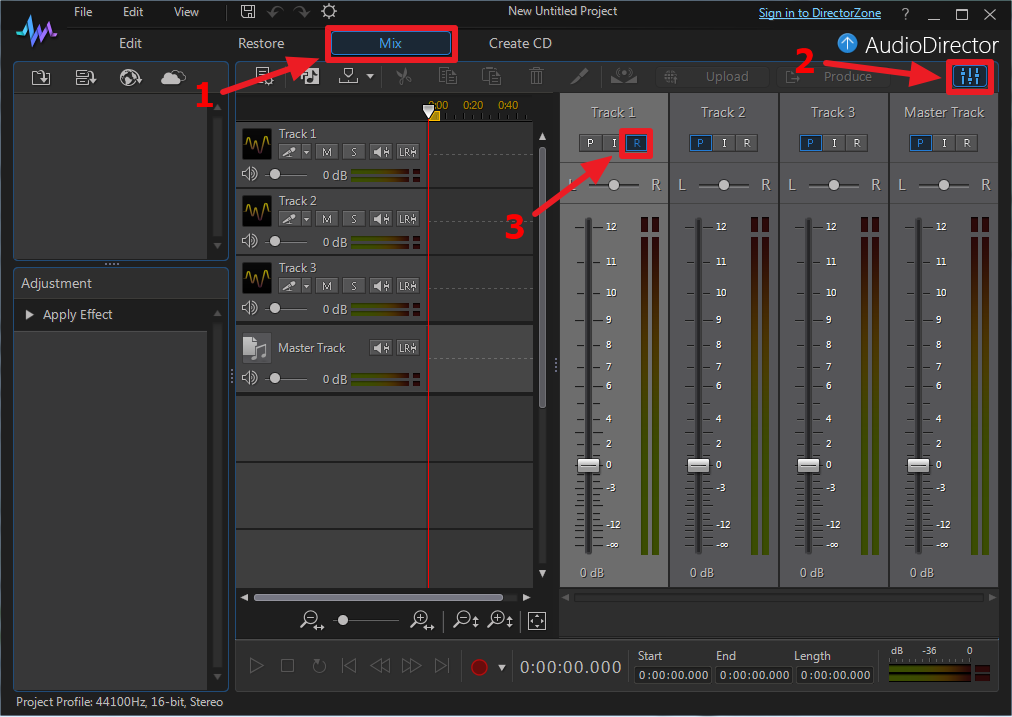
Mixer Panel is a new feature in CyberLink AudioDirector 5. To adjust the mix in real-time during recording, you can follow the steps below:
- Go to the Mix room.
- Click on Mixer Panel button
 in the upper right of the application.
 - Switch the tracks to record mode.
- Hold down the left mouse button to move up and down the mix controls
 based on previous setting during playback.
Note: CyberLink AudioDirector 5 supports the mixing of one track at a time.


