





How do I convert video/audio files and Audio CD content and then transfer to a mobile device?
Convert video/audio files and transfer to a mobile device:
- Click Media Converter and select Video to Mobile Device or Audio to Mobile Device.

- Select the file you want to convert and click Next button.
- After connecting the mobile device to your computer, CyberLink Power2Go should detect your device automatically. If it doesn't, try to click Auto Detect button or select the device brand and model manually.*
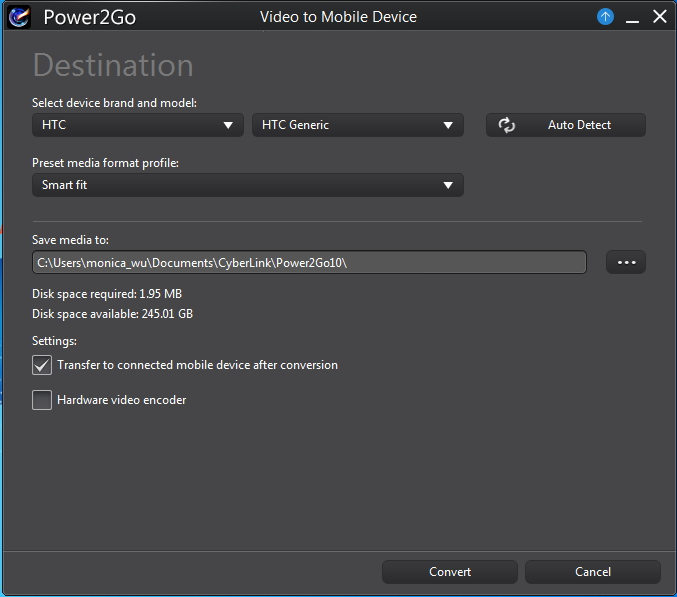
- Select the media format profile you want to convert. If you want to create your own profile, select Custom to customize the format and the resolution.
- If required, click
 button to change the folder where the converted files are temporarily saved to before being transferred to a mobile device.
 - Click Convert when you are ready to convert the file.**
Convert Audio CD content and transfer to a mobile device:
- Click Media Converter and select Audio CD to Mobile Device.
- Insert the disc and select your drive from the Select source drop-down.
- Select the audio tracks that you want to convert.
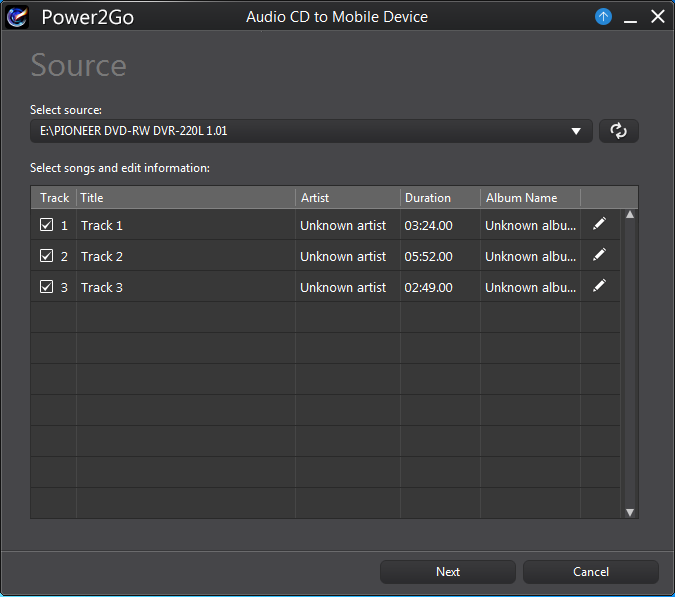
- If you want to modify the track information, please click here for more details.
- Select the mobile device brand and model and the file format.
- Click Convert when you are ready to convert the file.**
Note:
* If there is no device connected or your mobile device is not listed in the supported list, please select Generic for both the device brand and model. CyberLink Power2Go 10 will convert the file to a format that is suitable for your mobile device. You can find the converted file saved in the folder you chose in Save media to. Please click here for the currently supported mobile device list in CyberLink Power2Go 10.
** Select the Auto shut down after conversion option - if you want CyberLink Power2Go to automatically shut down your computer once it has successfully converted and transferred the files.


