





How to change the quality/file size of produced videos in CyberLink PowerDirector Mobile?
The quality and size of your produced videos are affected by the resolution, bitrate, and FPS settings in the export setting page, you can change the settings by doing the following:
- Tap the export icon on the editing page to enter the export settings page.
- Choose a resolution between SD(360p) and UltraHD(4K)*.
- Choose a bitrate range between smaller size and better quality.
- Choose a FPS range between 24 and 60.
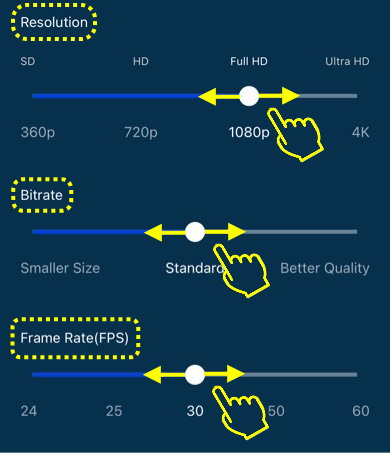
|
Note: Ultra HD(4K) video production needs certain hardware requirements. Please refer to the following FAQ for the requirements for Android and iOS devices:
|
(#export)


