





I cannot uninstall CyberLink TrueTheater Enhancer from within the Windows Add/Remove Programs. What can I do?
Issue:
User cannot uninstall CyberLink TrueTheater Enhancer within the Windows Add or Remove Programs Tool.
Cause:
The CyberLink TrueTheater Enhancer program is damaged or did not install correctly.
Solution:
- Restart your computer.
- Click here to download the Microsoft cleanup tool.
- To execute the Microsoft cleanup tool, follow these steps:
(1) Click Start, click All Programs, and then click Windows Installer Clean Up.
(2) In the Windows Installer Clean Up box, select TrueTheater Pack.
(3) Click Remove.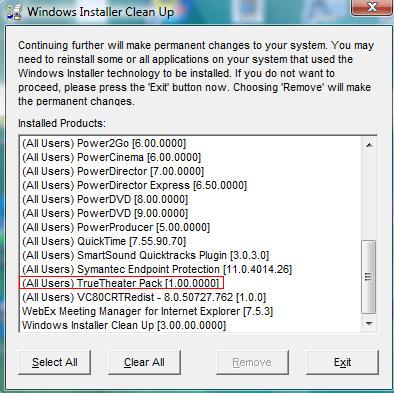
- Remove "TrueTheater Enhancer" installation Folder
For Windows XP and Windows Vista 32 bit:
The original Folder Path: C:\Program Files\CyberLink\TrueTheater Pack
For Windows Vista 64 bit:
The original PowerDVD Folder Path: C:\Program Files(x86)\CyberLink\ TrueTheater Pack - Remove C:\Program Files\InstallShield Installation Information{ 2C9617C7-6A62-4513-B96D-7C06B5C6C1F5}folder
(This is a hidden folder. Please enable show hidden files and folders option under Windows Explorer->organize->Folder and search options->view->Hidden files and folders) - To execute the Registry Editor, follow these steps:
For Windows Vista 32/64 bit:
(1) Click Start, click All Programs, click Accessories, click Run and then type Regedit.
For Windows XP:
(1) Click Start, click Run and then type Regedit.
For Windows Vista 32 bit and Windows XP:
(2) Remove HKEY_LOCAL_MACHINE\SOFTWARE\CyberLink\TT Pack
(3) Remove HKEY_LOCAL_MACHINE\SOFTWARE\Microsoft\Windows\CurrentVersion\Uninstall\ { 2C9617C7-6A62-4513-B96D-7C06B5C6C1F5}
(4) Remove HKEY_LOCAL_MACHINE\SOFTWARE\Microsoft\Windows\CurrentVersion\Uninstall\InstallShield Uninstall Information\ { 2C9617C7-6A62-4513-B96D-7C06B5C6C1F5}
(5) Remove HKEY_LOCAL_MACHINE\SOFTWARE\Microsoft\Windows\CurrentVersion\Uninstall\InstallShield_ { 2C9617C7-6A62-4513-B96D-7C06B5C6C1F5}
For Windows Vista 64 bit:
(2) Remove HKEY_LOCAL_MACHINE\SOFTWARE\WOW6432Node\CyberLink\ TT Pack
(3) Remove HKEY_LOCAL_MACHINE\SOFTWARE\Wow6432Node\Microsoft\Windows\CurrentVersion\Uninstall\{ 2C9617C7-6A62-4513-B96D-7C06B5C6C1F5}
(4) Remove HKEY_LOCAL_MACHINE\SOFTWARE\Wow6432Node\Microsoft\Windows\CurrentVersion\Uninstall\InstallShield Uninstall Information\ { 2C9617C7-6A62-4513-B96D-7C06B5C6C1F5}
(5) Remove HKEY_LOCAL_MACHINE\SOFTWARE\Wow6432Node\Microsoft\Windows\CurrentVersion\Uninstall\InstallShield_ { 2C9617C7-6A62-4513-B96D-7C06B5C6C1F5}
Restart your machine. After finish these all steps, your TrueTheater Enhancer is completely removed.


