





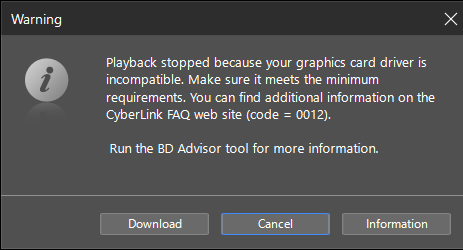
I cannot play Blu-ray video discs and receive error 0012 after updating my NVIDIA graphics driver to version 610.88 or above in PowerDVD 22 or earlier versions. What can I do?
NVIDIA graphics driver version 610.88 and above changes the video processing pipeline on Digital Rights Management (DRM) content for new NVIDIA GPU models, which impacts Blu-ray video disc playback in Windows OS. Older versions of PowerDVD (PowerDVD 22 or earlier) are not compliant with this updated graphics driver version or the newer GPU hardware installed with it, and you will receive the 0012 playback error while playing Blu-ray video discs.
Option 1: Restore Graphics Driver Version
If you wish to continue using PowerDVD 22 or earlier, consider restoring your NVIDIA graphics driver to version 610.74 or below. You can download driver versions compatible with your GPU model directly from the NVIDIA support page at https://www.nvidia.com/en-us/drivers/. After reinstalling driver version 610.74 or earlier, re-launch PowerDVD to test playback. This is the quickest and most direct solution to resolve the error.
Option 2: Upgrade to a Newer PowerDVD Version
If restoring your GPU driver is not a feasible workaround on your platform, consider purchasing a newer version of PowerDVD (PowerDVD 23 or above). Newer versions maintain full compatibility with current NVIDIA GPU hardware and updated driver protocols. Before purchasing, you can test playback performance by downloading the latest free Essential edition of PowerDVD available at https://www.cyberlink.com/products/powerdvd-ultra/overview.html to ensure software features and compatibility meet your expectations.


