





Why is the option Smart Transition grayed out or not available in CyberLink AudioDirector 4?
When using the Smart Transition in CyberLink AudioDirector 4, you may find that it is not working. If this occurs, please check the following:
- Smart Transition can only be applied on audio that has a Stereo profile setting.
- Go to Mix room
- Click on the Configure audio profile settings in Mix room
 button
 - Select the Stereo for audio channels in drop-down list.
- Smart Transition can only be applied on transitions that are less than or equal to 30 seconds. If the overlap between the two audio clips exceeds 30 seconds, the Smart Transition option will be gray out.
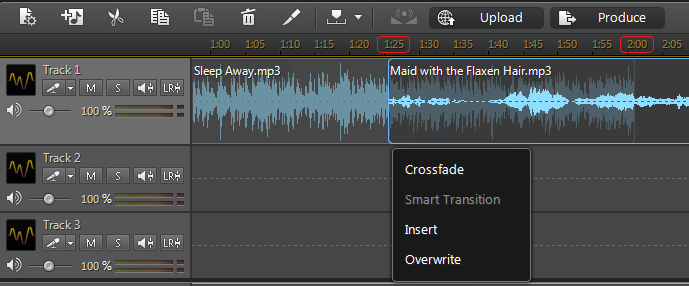
- If you change the audio profile setting in the Mix room from Stereo to mono, 5.1 or 7.1 channels, you will find that the smart transition you applied changes to an warning [!] icon.



