





How to adjust video speed in CyberLink PowerDirector Mobile?
To adjust the speed of video or audio clips, follow the below steps:
1. Select a video or audio clip on the timeline.
2. A toolbar will pop up from the bottom of the screen
3. Tap the "Speed" icon on the toolbar.

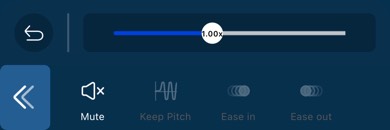
4. Adjust the speed of the video/audio clip using the slider.
5. You can also apply the "Keep Pitch", "Ease in", and "Ease out" effects on the clip simultaneously.
| Note: * For more Speed Adjustment related information, please visit the video tutorials page. * The interface displayed in the video tutorial may be different from the interface of the latest version of PowerDirector Mobile. |


