





What is 8K Ultra HD video? How do I play back 8K Ultra HD video in CyberLink PowerDVD 19 or later versions?
8K Ultra HD video encodes the video with a much higher graphic resolution of 7,680 x 4,320 pixels. It is capable to display visual detail 4 times more than a 4K Ultra HD (3,840 x 2,160) video (e.g. Ultra HD Blu-ray), and 16 times more than a Full HD (1,920 x 1,080) video (e.g. Blu-ray movies).
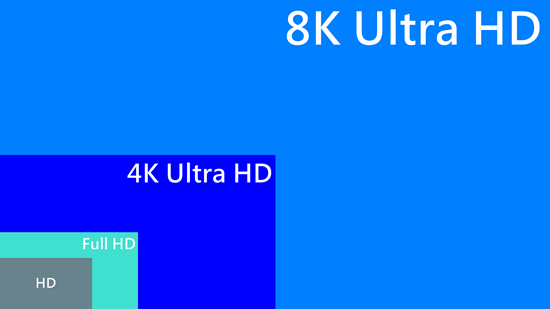
To play an 8K Ultra HD video in PowerDVD 19 or later versions, it requires higher requirements for the GPU hardware, and a display setup on your platform for processing the ultra high resolution video. You are advised to apply an 8K playback compatible GPU, and display setup that support displaying the full detail of an 8K Ultra HD video.
For instance:
- Display connection: HDMI 2.1 or DisplayPort 1.4 support on the display device and GPU.
- GPU: Intel 7th Generation Core i7 (Kaby Lake) with HD (UHD) Graphics 630, or NVIDIA Geforce GTX 1000 series or above.
If your display hardware does not have the 8K display capability, the 8K video content will be played in your current display device resolution instead.
Note:
- 8K video playback is supported in Windows 10 or above 64 bit platforms.
- CyberLink PowerDVD supports 8K Ultra HD video (up to 7680 × 4320 resolution, 30 FPS) in HEVC 8/10bits , VP9 8/10bits (depend on GPU ability).
- TrueTheater video enhancements, media casting, media library sharing via Home Network, YouTube features, etc. do not support 8K video playback.


